Human-in-the-loop
"What needs human action." When an agent pauses for a human decision, the run
blockeds and a task appears in the Human tasks queue.
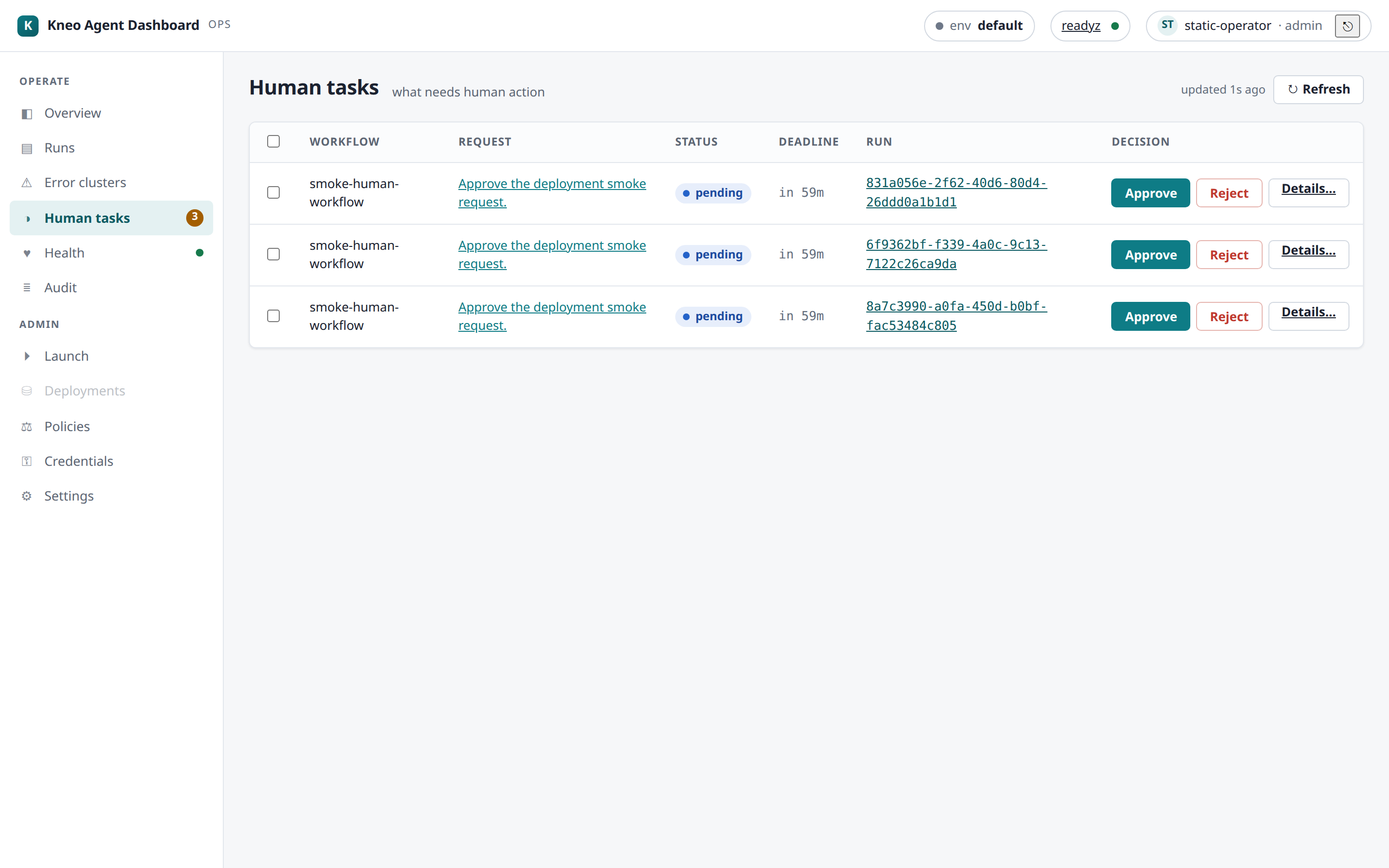
The queue
Tasks are listed deadline-first. Each row shows the workflow, the request summary
(links to the detail), status (pending / escalated), the deadline (a warn pill when
near or overdue), and the run. The nav badge carries the live pending count.
escalated— the task timed out but is still resumable; it stays in the queue rather than disappearing.- Near-deadline — a task approaching its deadline shows a warn pill and raises a one-time near-deadline toast so you notice before it expires.
Deciding a task
- Fast path — the queue's Approve / Reject buttons resume immediately.
- Richer decisions — open Details… for a task that needs content or a choice:
provide (supply content), edit (amend), or select (pick from
options). The detail view shows the request prompt + the redacted message thread.
Every resume is idempotent — a per-attempt Idempotency-Key makes a retry safe, and
kneo-client replays rather than double-resuming. Resuming past the deadline surfaces a
clear "task expired" message (human_task_expired) and refreshes the queue.
Worked example — approve a refund hold. A refund run blocks on a "confirm amount" task.
It appears in the queue with a near-deadline pill. Open Details…, read the request prompt
+ the redacted thread, and either hit Approve (fast path) or, if it needs a value, use
provide to supply the amount and resume. The run leaves blocked and the task drops off the
queue; if you were a minute too late, you get "task expired" and the run stays blocked for a
fresh escalation.
Bulk resume
Select several rows (per-row checkboxes or select-all) and apply one decision — Approve
selected / Reject selected. The Dashboard fans out one idempotent resume per task,
each independent: an expired or conflicting task doesn't sink the batch. A results banner
summarizes N succeeded / M failed, grouped by reason (e.g. human_task_expired,
run_state_conflict).
Note
Resuming is platform-authoritative — the platform enforces who may resume via its
scope. On top of that the Dashboard authorizes it server-side by capability (0.4.0):
resume requires the run.control capability (held by operator+admin in the built-in default map; reassignable via the Access map — the role is just the lookup key), and the acting operator
gets a best-effort append to the local audit log (best-effort, not guaranteed — see
the audit contract).
Related
- Runs & debugging — a blocked run's detail + Resume.
- Settings › Access — who holds
run.control. - Troubleshooting —
human_task_expiredand other resume outcomes.